Our team is already completing the 3rd phase of eVote. The hardware is complete and fully functional.
The remaining items to be completed are elements from the administrator application. Currently we are trying to find out how to acquire printing results from the printer once eVote has printed a receipt.
The scalability is also almost complete.
At this pace, we will have everything done in time for the third happy hour December 1, 2008.
miércoles, 26 de noviembre de 2008

miércoles, 12 de noviembre de 2008
Write-in Module
The writing module code has been written and today I met with Javier to test the data on the evote prototype device. While testing we found errors with pointers , but this was fixed by reviewing how to work with pointers in C.
The write in screen currently supports keypad navigation and selection of letters.
Errors have been seen when typing letter and backspaces and when moving through the alphabet (the selected action happens twice).
The write in module successfully returns the array of the write in information.
The write in screen currently supports keypad navigation and selection of letters.
Errors have been seen when typing letter and backspaces and when moving through the alphabet (the selected action happens twice).
The write in module successfully returns the array of the write in information.
jueves, 6 de noviembre de 2008
Schedule Changes & Evote device program size limit
Due to an unforeseen Academic Recess (from Thursday, October 31 to Thursday, November 5) several Capstone course activities have been re-scheduled. There will not be a status report on Friday, November 6 since there has not been enough work days since the last presentation. Also, the Oral Test scheduled for next Monday, November 10 has been rescheduled for Monday, November 17.
In addition, several changes have been added to the Change Control document as the debugging program Javier is using for all programming related to the evote machine is beggining to signal that the program is reaching the 4kb limit.
In addition, several changes have been added to the Change Control document as the debugging program Javier is using for all programming related to the evote machine is beggining to signal that the program is reaching the 4kb limit.
lunes, 27 de octubre de 2008
Progress Report and Design Changes document
JSAL prepared a design change document and provided a copy to the client (the capstone professors). The document provided the changes desired by the client to include a write-in feature within the firmware of eVote. The document also pointed out that additional funds may be necessary due to the added feature, but due to time constraints, the feature will be completed by clocking in additional hours and this will be reflected in future progress reports.
The keyboard was successfully integrated with the microprocessor and was able to navigate between two different screens. The security of the database data has also progressed to finding a 128 bit encryption method that uses a password that will be used to decrypt the database parameters when being called upon in the administrator program.
The screen for the write-in has been designed and implemented, but the navigational code has yet to be implemented and will be worked on after the progress report presentation.
The screens of eVote have been implemented except for the ballots for the governor and resident commisioner which will be worked on after the progress report due to the fact that these screens have images on them that require additional work to calculate their pixel positions.
The keyboard was successfully integrated with the microprocessor and was able to navigate between two different screens. The security of the database data has also progressed to finding a 128 bit encryption method that uses a password that will be used to decrypt the database parameters when being called upon in the administrator program.
The screen for the write-in has been designed and implemented, but the navigational code has yet to be implemented and will be worked on after the progress report presentation.
The screens of eVote have been implemented except for the ballots for the governor and resident commisioner which will be worked on after the progress report due to the fact that these screens have images on them that require additional work to calculate their pixel positions.
jueves, 23 de octubre de 2008
LCD Screens, Navigation keypad and Database security
The team is working with the tasks for the second phase of the project. Laura is working with the write-in screen. In order to design the screen, a table is being used to establish the coordinates in which a letter will appear. Javier is working with the screens for voting. These screens include language selection, integral or mixed voting selection as well as write in option selection. Angel is working with the encryption and decryption of the information stored in the database. Sylvia is working with the keypad for navigation. Yesterday Sylvia and Javier tested the keypad to look at the output voltage from each of the pressed keys. The keypad regulates the input voltage to have an output voltage of 3V. Therefore, there is no need to have a voltage regulator. Sylvia, Javier and Laura are working with dependent modules from one another; therefore before start working the design was discussed.
Below a picture of the keypad testing

lunes, 20 de octubre de 2008
Lcd screens and navigation
During the day the team discussed feedback from friday's happy hour sessions. The day's work revolved around:
1. "Write-In" in-depth design : Write in screen has been designed and code is currently being made for displaying it on the LCD
2. Language selection in-depth design: Design began for the way in which the program handles language selection on the code level
3. Overview of Keyboard navigation
4. LCD matrix table (Excel): This table is being used to design the different screens (see image below)
miércoles, 15 de octubre de 2008
sábado, 11 de octubre de 2008
LCD Updates
The LCD is now working!
After various days, it was observed that the initialization code was affected by the reset process. After the reset process was removed the LCD started working, but still had problems due to the voltage supply. The cables were not making the correct contact with the circuit and the power supply. After resolving the issue with the cables, the LCD worked.
Below some pictures of the LCD working.


After various days, it was observed that the initialization code was affected by the reset process. After the reset process was removed the LCD started working, but still had problems due to the voltage supply. The cables were not making the correct contact with the circuit and the power supply. After resolving the issue with the cables, the LCD worked.
Below some pictures of the LCD working.


jueves, 9 de octubre de 2008
Risk: Possible Change in Computers
We have been informed that the computers in room S-123 might be changed on friday or early next week.
We have made backups of our code and database in order to prevent any loss of information.
Also, we have informed the Help@ECE staff that the new computers will require the installation of: MySQL Server & Tools, MyODBC Driver 3.51, TortoiseSVN, Visual Studio 2008, and the BarCode font.
All the development plans have been made assuming Windows XP will be the OS used, so if these new computers have Windows Vista we might have to run our applications in a virtual machine with XP in order to avoid any issues.
We have made backups of our code and database in order to prevent any loss of information.
Also, we have informed the Help@ECE staff that the new computers will require the installation of: MySQL Server & Tools, MyODBC Driver 3.51, TortoiseSVN, Visual Studio 2008, and the BarCode font.
All the development plans have been made assuming Windows XP will be the OS used, so if these new computers have Windows Vista we might have to run our applications in a virtual machine with XP in order to avoid any issues.
Database Design Changes
Through out this phase there have been unplanned changes to the evote database. The Position table was removed since it wasn't vital and the information could be stored in a different table. This table might make coding efficient in the Raven version but for the Sparrow version it is not necessary.
Today, a column called "Barcode" was added to the candidate table . This field will store the text to be converted to the printed receipt.
A history table was added to associate a an official to a voter. This way, should there be any problems with a voter or an official, related people can be identified.
The kiosk table was given an additional identification number to make the voting experience better for voters and officials. The kID field is unique for every kiosk, so in a real life scenario every kiosk in the area using the system will have a different number. This number would only be useful when looking at the kiosks from an outside perspective. In the voting units, the officials and voters need local identification number that will make it easy for them to know where a voter has to go.
Today, a column called "Barcode" was added to the candidate table . This field will store the text to be converted to the printed receipt.
A history table was added to associate a an official to a voter. This way, should there be any problems with a voter or an official, related people can be identified.
The kiosk table was given an additional identification number to make the voting experience better for voters and officials. The kID field is unique for every kiosk, so in a real life scenario every kiosk in the area using the system will have a different number. This number would only be useful when looking at the kiosks from an outside perspective. In the voting units, the officials and voters need local identification number that will make it easy for them to know where a voter has to go.
lunes, 6 de octubre de 2008
Hardware and Firmware
The hardware has been completely integrated, Javier decided it was better to use a breadboard for the project since it offers more stability in terms of movement compared to a wirewrapped pc board which was giving a challenge to integrate nicely with the LCD cables. So the wirewrapped circuit was undone and redone on the breadboard where we have completely connected all the LCD cables to their voltage, ground and data pins throughout the breadboard inverter and microprocessor circuits.
The programming of the firmware will be done on tuesday with the hopes of completing the initialization of the LCD and showing an onscreen test message as promised in the Gantt chart.
The programming of the firmware will be done on tuesday with the hopes of completing the initialization of the LCD and showing an onscreen test message as promised in the Gantt chart.
viernes, 3 de octubre de 2008
Inverter Updates
Javier has already completed the inverter circuit by wirewrapping. The connections were verified by Sylvia. Both, Javier and Sylvia tested the connection by applying a voltage to the circuit and verifying the output. The output was a valid voltage as an input into the VO pin (back plane voltage) of the LCD. Next week Javier will implement the connections for the LCD to the microprocessor and the inverter. After that is done, the first test screen will be implemented.
Below are the images of the wirewrapping and the voltage test.


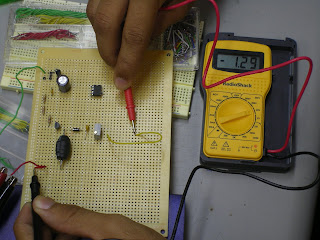
Below are the images of the wirewrapping and the voltage test.


jueves, 2 de octubre de 2008
Database updates
On monday, the staff installed Visual Studio 2008 in all four of our computers. The ODBC driver was also installed in the two remaining computers.
Laura is currently working in the Log In form for officials volunteering in the elections. The form is able to communicate with the database and drop down boxes with information on the db according to selections made in other fields. Laura is currently having issues with displaying some results that are included in three columns.
Angel is currently working with a test application that can prove votes are being inserted into the database. Sylvia has finished designing the UI for the administrator application and is now working with Laura to query information from the database
Laura is currently working in the Log In form for officials volunteering in the elections. The form is able to communicate with the database and drop down boxes with information on the db according to selections made in other fields. Laura is currently having issues with displaying some results that are included in three columns.
Angel is currently working with a test application that can prove votes are being inserted into the database. Sylvia has finished designing the UI for the administrator application and is now working with Laura to query information from the database
Functional Inverter and LCD
After receiving the components needed to implement an inverter that was designed for the LCD Screen which is copyrighted in 2006 by Snowleopard Labs and is used in this project by permission with an email for evidence backup.
The inverter has been connected as seen in the following pictures and each node was tested to make sure that the entry voltage did not fluctuate which could cause the LCD's max voltage to be passed causing the LCD to burn out.
The original design was modified to include voltage regulators to add an additional protective measure to avoid any components from receiving more voltage that desired. The voltage input for the inverter was set at 5 volts and the regulator prevents any voltage above this voltage from passing on into the inverter.
Javier was able to successfully complete the circuit and connect it to the LCD which turned on showing lines. At first it was assumed that the lines were not normal, but having done research before implementing the circuit, the lines that appear randomly are normal until the LCD is initialized with firmware.
It is being considered if we are to wire wrap the components and then proceed to the programming of the LCD using the IAR workbence program.

Inverter Connected to LCD

LCD with random lines - The contrast was adjusted using a potentiometer


Inverter Circuit that provides the Backplane voltage for the LCD (Vo)
martes, 30 de septiembre de 2008
ODBC driver and MySQL issues
After deciding to use C#/ODBC to communicate with the database (in mySQL). The team began to make arrangements to setup the computers with the necessary drivers. The ODBC driver was installed in Angel's and Laura's computers. However, after the installation we realized that Angel's computer is missing Visual Studio 2005 for some reason. Angel and Laura emailed help@ece.uprm.edu again in order to have this installed.
Laura succesfully added the ODBC driver into her computer ( through control panel-->administrative options-->ODBC Data Source Adminstration). Eventhough Laura's computer has VS 2005 and the ODBC driver, there are still some issues with Visual Studio and the MySql library (MySQL.Data). Laura is testing different methods of adding this library to the project (adding it as a reference).
Today we expect to resolve the VS issue in angel's computer and also get the ODBC driver installed in the remaining two computers.
Laura succesfully added the ODBC driver into her computer ( through control panel-->administrative options-->ODBC Data Source Adminstration). Eventhough Laura's computer has VS 2005 and the ODBC driver, there are still some issues with Visual Studio and the MySql library (MySQL.Data). Laura is testing different methods of adding this library to the project (adding it as a reference).
Today we expect to resolve the VS issue in angel's computer and also get the ODBC driver installed in the remaining two computers.
miércoles, 24 de septiembre de 2008
Hardware Testing
Today, tests were done to verify the functionality of every pin of each port found in the microprocessor, and every pin turned on successfully indicating that the soldering was not faulty.
The voltage regulators since never before used, were tested in a simple circuit to turn on a LED which would get damaged if given 5 volts. Tests were done with resistors and LED lights. A 3.3V regulator was used to intercept the voltage and output an acceptable amount of voltage that turns the led on as seen in the photos below.


The voltage regulators since never before used, were tested in a simple circuit to turn on a LED which would get damaged if given 5 volts. Tests were done with resistors and LED lights. A 3.3V regulator was used to intercept the voltage and output an acceptable amount of voltage that turns the led on as seen in the photos below.

Testing regulator with resistance

Testing regulator with LED
 Testing the microprocessor pins with a multimeter and c language code.
Rain Storm, DB decision
Due to the severe weather classes were suspended on monday and we have not met this week. Today we will resume all capstone work.
Laura, Angel and Sylvia discussed last week the possibility of changing programming language due to the fact that it was considerably easier to make a graphical user interface with C# that with Java. After some research during the weekend and free days Laura learned that the C# interface with a database (ODBC) is similar to JDBC (the JAVA interface) and making this change would not pose any major obstacles. In fact, it was found that there is more support for ODBC than for JDBC.
Laura and Angel will begin to study how to use ODBC while Sylvia prepares to work with the user interface.
Laura, Angel and Sylvia discussed last week the possibility of changing programming language due to the fact that it was considerably easier to make a graphical user interface with C# that with Java. After some research during the weekend and free days Laura learned that the C# interface with a database (ODBC) is similar to JDBC (the JAVA interface) and making this change would not pose any major obstacles. In fact, it was found that there is more support for ODBC than for JDBC.
Laura and Angel will begin to study how to use ODBC while Sylvia prepares to work with the user interface.
lunes, 22 de septiembre de 2008
LCD additional hardware
Upon beginning the work for integrating the LCD which arrived just last friday with the microprocessor, it was discovered that an inverter would be needed to adjust the contrast to the LCD screen. Research has been done online to discover what kind of circuit exactly is needed and one was found with a potentiometer that allows adjustments to the contrast of the screen.
The parts were purchased and hopefully arrive by the end of the week to begin the implementation of the inverter design.
The parts were purchased and hopefully arrive by the end of the week to begin the implementation of the inverter design.
jueves, 18 de septiembre de 2008
MySQL, First soldering, Faulty equipment
Today Laura arranged with the admins of ece.uprm.edu the installation of the MySQL service in all computer in our area. Now we can create our database and interact with it from the four computers we use.
Javier finished his first soldering experience and soldered 100 pins. While testing if the soldering had been done correctly, we found out that the multimeter assigned to us did not measure current and voltage correctly. Tomorrow we will purchase a multimeter for our team.
Javier finished his first soldering experience and soldered 100 pins. While testing if the soldering had been done correctly, we found out that the multimeter assigned to us did not measure current and voltage correctly. Tomorrow we will purchase a multimeter for our team.
miércoles, 17 de septiembre de 2008
Phase I development
The team has begun work on the implementation phase of the Sparrow design. We are currently soldering the hardware components, finding a database space to begin implementation and also have begun to program the software interface which has been promised for the first phase.
Due to the hardware complexity, it has been decided to present an initial programmed screen before implementing all of the screens needed for eVote which will be done in the second phase.
The team also purchased the uniforms today with our logos and names on them for future presentations.
Due to the hardware complexity, it has been decided to present an initial programmed screen before implementing all of the screens needed for eVote which will be done in the second phase.
The team also purchased the uniforms today with our logos and names on them for future presentations.
The hardware soldering has begun, below are images of the ports of the development kit being integrated with connectors.


Suscribirse a:
Entradas (Atom)